Does the amount of memory for an AWS Lambda function affect REST calls made to third parties?
For those on a budget, decreasing the cost of each AWS Lambda execution is key. For novices, this is done by leaving functions at the minimum 128MB of memory. However, increasing the amount of memory a function has allocated to it also increases the amount of cpu allocated to it. This makes a function run faster, even if it’s not being limited by memory. The increase in cpu has a linear relationship with the memory allocated, causing the execution to cost the same no matter the memory.
Note: At a certain point, AWS will start allocating multiple cpu cores to your function. If your function can’t take advantage of the multiple cores, further increases in memory will be cost ineffective.
How about for third parties, where we don’t have the ability to change their cpu allocation - will calls to them also speed up?
For this experiment, we’ll be running a simple node.js function, using the node-fetch library to make REST calls to third parties.
You can install node-fetch with:
npm install node-fetch
We will be using the following function to make the calls and produce the results:
const { performance } = require('perf_hooks');
const fetch = require('node-fetch');

exports.handler = async (event) => {
    // A REST api to use for testing
    const url = 'http://ip-api.com/json/';

    // Record when we start the REST calls
    const startTime = performance.now();

    // Call the REST api 100 times
    for (let i = 0; i < 100; i++) {
      await fetch(url);
    }

    // Record when we end the REST calls
    const endTime = performance.now();

    // Return the average time that it took to perform the REST calls
    return {
        statusCode: 200,
        body: `Took ${(endTime - startTime) / 100}ms`,
    };
};
We will be testing with 3 free REST APIs:
We will be testing with the following memory configurations:
- 128MB (the minimum value)
- 256MB
- 512MB
- 1GB
The results are displayed in the following graph:
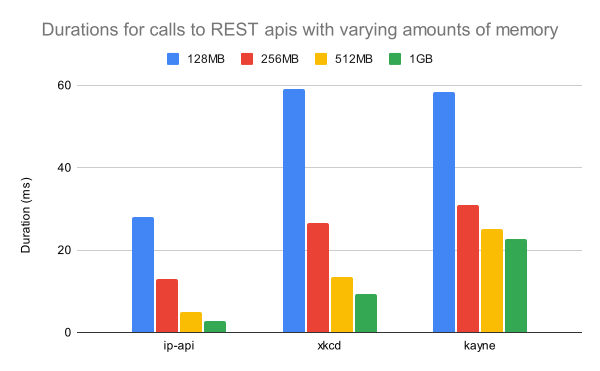
Thus, it is clear that increasing the memory allocated to your function also decreases the time spent calling REST endpoints. This may be due to an increase in network bandwidth proportional to memory. Future experiments should test the bandwidth speed allocation to a function vs the allocated memory.
In conclusion, not only does increasing an AWS Lambda function’s memory decreases execution time by increasing cpu allocation, it also decreases the execution time by decreasing the duration of REST api calls. Thus, you do not need to stay at the 128MB memory minimum, but can increase your memory allocation while staying cost effective.